.png)
Best Property Monitoring Services in 2026

TL;DR
- Property monitoring splits into seven separate jobs: work orders, unit condition, appliance and equipment condition, water, energy and lifecycle, preventive maintenance, and access. Most teams end up running three or four tools to cover them.
- Repairs rarely bankrupt a budget. The gap between something going wrong and someone finding out does, through emergency truck rolls, water damage that had time to spread, and units sitting vacant longer because nobody knew their actual condition.
- AppFolio keeps leasing, rent, and maintenance history in one operational record. HappyCo backs every inspection and turns with time-stamped photos and signatures. Enertiv builds the multi-year consumption and equipment-age picture a capital plan needs.
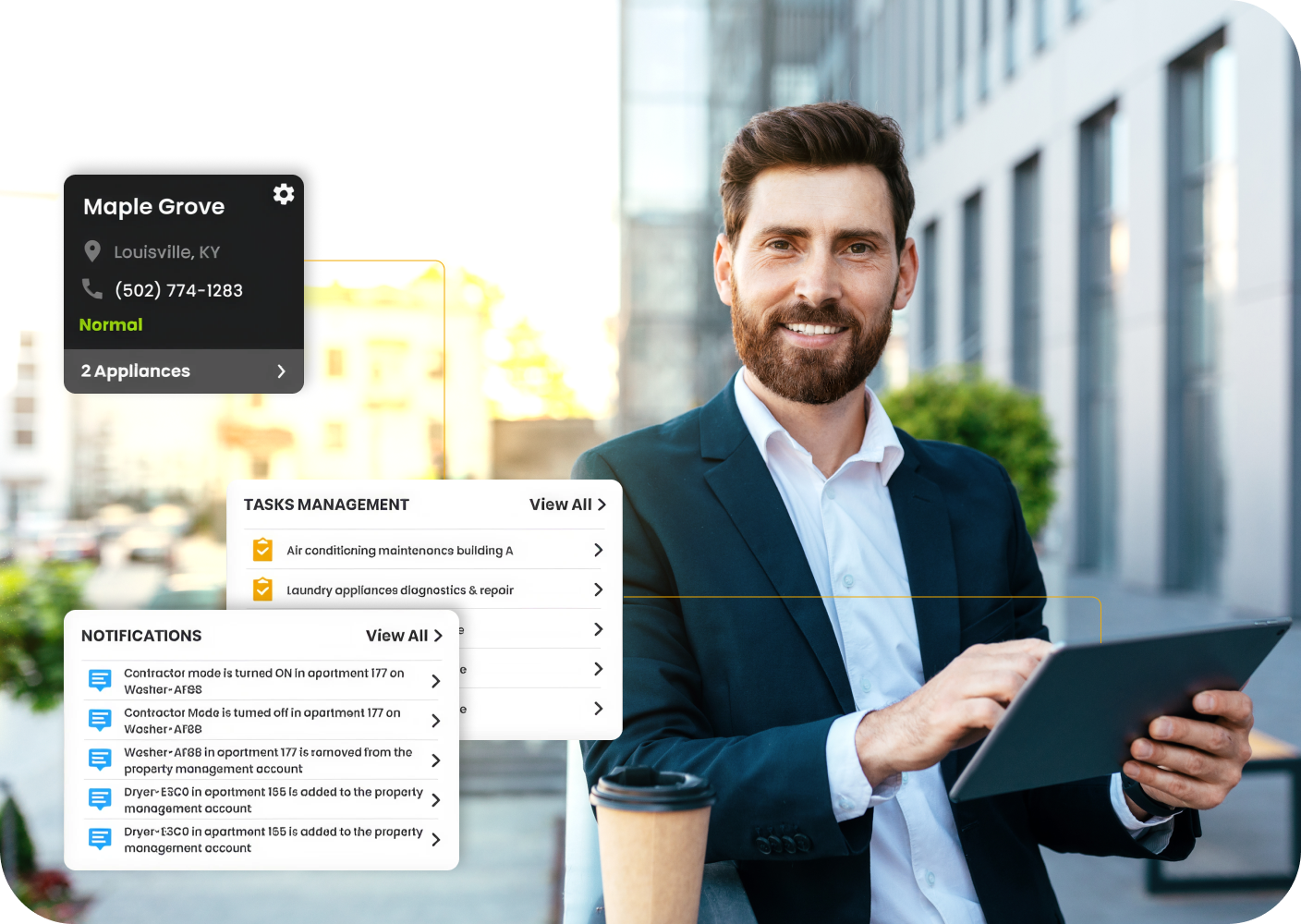
- SmartHQ™ Management reads what a connected GE Appliance is already reporting and routes it to whoever's responsible. A leak or a fault reaches your team as a scoped task, not a guest complaint.
- Yardi Voyager, SmartRent, PointCentral, Alert Labs, UpKeep, and ButterflyMX round out the list, each covering one narrower job: enterprise accounting, water risk, or the front door.
A property manager can only be in one place at a time. Everything else, every unit, every mechanical room, every leak sensor, isEverything else, from individual units and mechanical rooms to leak sensors, is running unsupervised unless something reports back.
With property monitoring, what's already happening across a portfolio becomes visible and actionable, rather than something a resident has to call in.
The problem is that the category covers a lot of ground under one name. Work order platforms, leak sensors, energy dashboards, and video intercoms all fall under "monitoring," and each one watches a completely different part of the building. Buy the wrong one, or buy too many of the same kind, and you're still missing whatever layer nobody's watching.
This guide covers 10 services by the one job each does, so you can match a service to an existing gap in your portfolio.
The 7 Jobs a Property Monitoring Stack Has to Cover
A property team may use one system for work orders, another for inspections, and separate tools for leak detection, energy monitoring, or building access. These are different operational jobs, but they all answer the same question: what is happening across the property right now?
Here are the seven jobs a property monitoring stack needs to cover:
- Work order activity: Request intake, assignment, status, and the record of what was fixed in which unit.
- Unit condition: Move-in, move-out, and periodic inspections with photo evidence, plus how far along each make-ready has progressed.
- Appliance and equipment condition: Fault codes, leak sensor state, firmware currency, and energy draw, reported by the machines themselves rather than by residents.
- Water: Flow rates, leak detection, unusual consumption, and automatic shutoff where a valve is installed.
- Energy and equipment lifecycle: Consumption patterns and equipment age, which together tell you when replacement makes more sense than another repair.
- Preventive maintenance: Recurring servicing, filter changes, and warranty tracking against specific assets.
- Access and perimeter: Entry, visitor and vendor credentials, package delivery, and movement through common areas.
Your core platform likely covers two or three of these well. The rest tend to live in spreadsheets, shared inboxes, or the memory of whoever has been there longest.
Key Insight: Monitoring is two jobs sharing one name. A work order system reports what a resident told you. An equipment monitoring system reports what the appliance detected, often days before anyone in the unit notices. Treating one as a substitute for the other is the mistake that shows up most often in a property stack.
The 4 Services Doing the Most Work in a 2026 Stack
Four services cover the four jobs that get expensive fastest when they live in a spreadsheet:
- AppFolio holds your operational record. Work orders, leasing, and maintenance history sit against the unit, and the mobile build is strong enough that leasing and maintenance staff both use it daily.
- SmartHQ™ Management monitors continuously. Fault codes surface in real time across every connected GE Appliance in the portfolio, and with GE leak sensors installed, leak alerts do too. Your team sees the problem on the dashboard, creates a task, and assigns it before a resident ever calls.
- HappyCo documents your units. Inspections and turns carry time-stamped photos and signatures, which is what settles a deposit dispute six months later.
- Enertiv watches your equipment across years rather than days. Consumption data and equipment age feed the capital plan and any sustainability reporting you owe investors.
The remaining six offer either a different route to the core record or a specialist layer beside it:
- Yardi Voyager for accounting depth across mixed asset types
- SmartRent for in-unit devices and credential-based access
- PointCentral for smart home paired with automatic water shutoff
- Alert Labs for water monitoring where building coverage is weak
- UpKeep for preventive scheduling on mechanical equipment
- ButterflyMX for entry, visitors, and package delivery
10 Property Monitoring Services at a Glance
Here is the full list in one view, with the job each service owns and the point where its scope ends.
10 property monitoring services by the job each one handles
Pricing reflects August 2026 data. Since review counts change weekly, re-check each dashboard before publishing.
1. AppFolio: Best for Portfolio-Wide Work Order Visibility
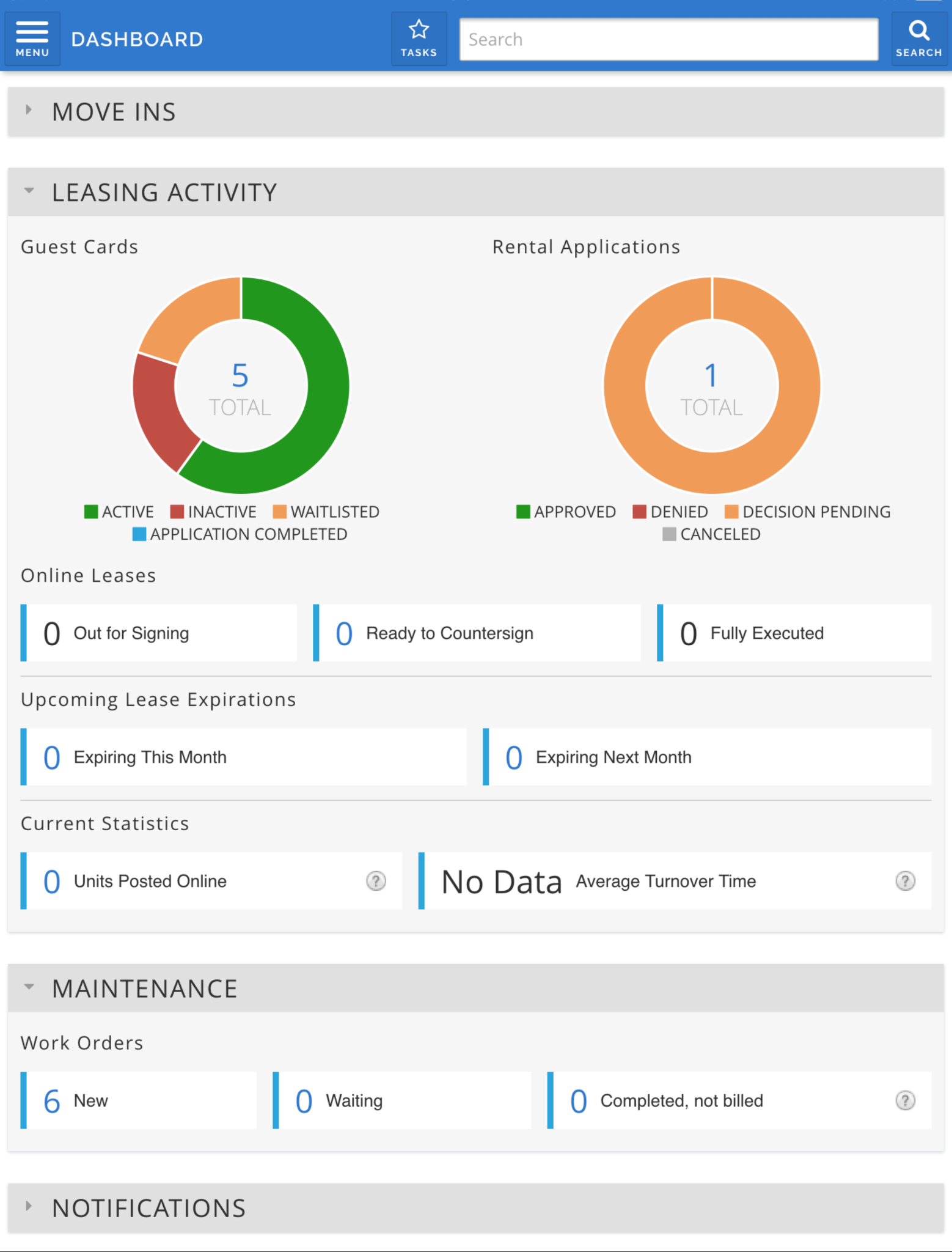
AppFolio suits you if your portfolio runs above 50 units and you want leasing, rent, and maintenance history living in one database. Requests arrive through the resident app and land in the work order queue without anyone retyping them, and the history stays attached to the unit permanently.
Recent development has focused on an AI layer reading the same data. It handles maintenance intake and answers questions about work orders, which saves your team building an export every time somebody asks how the month went.
Where it stops is at the equipment. AppFolio records that a repair was requested and who took it. Whether the compressor threw the same fault three times last quarter sits outside what it can see, because nothing in the building reports to it.
What you can do with AppFolio
- Handle intake around the clock: Realm-X Maintenance Performer responds to maintenance requests outside office hours
- Route requests without retyping: Resident submissions arrive directly in the work order queue
- Keep unit history in one place: Lease, resident, and maintenance records stay attached to the unit
- Work from the field: Mobile apps built for leasing agents and maintenance staff rather than desktop users
AppFolio Pros and Cons
Pricing: Quote-based across Core, Plus, and Max. Core carries a 50-unit minimum.
2. SmartHQ™ Management: Best for Appliance and HVAC Condition
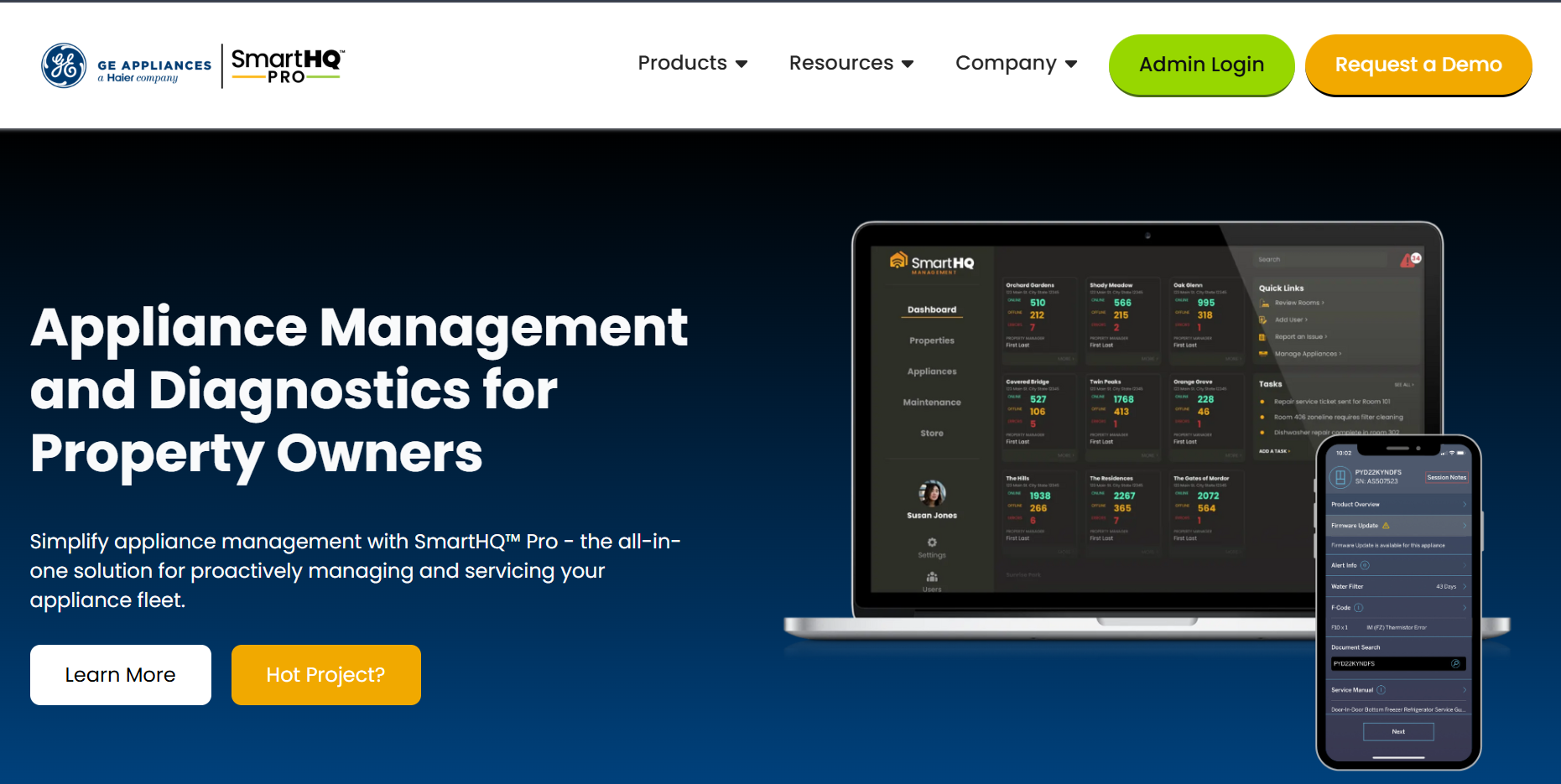
SmartHQ™ Management is ideal if your properties run Wi-Fi-enabled GE Appliances, including Zoneline PTAC and VTAC systems, and you want to hear about a problem from your dashboard rather than from a guest. Leak sensor state, fault codes, firmware status, and energy consumption all report into one view covering every property in your account.
That changes the shape of a repair. A fault becomes a task you assign to a named person, scoped down to the exact room, with a due date attached. Where the job needs a professional, a Bodewell connection lets you schedule appliance service straight from the alert.
The approach differs from the device platforms further down this list. Rather than installing a separate layer of monitoring hardware, you read what the appliances you already own are reporting about themselves, leak protection being the exception, since that pairs with GE leak sensors. It works over your existing property Wi-Fi, though your IT team will want to confirm the network is a fit first.
Hotels, extended-stay, student housing, senior living, and multifamily operators all use it, whether the focus is HVAC or the wider appliance mix.
What you can do with SmartHQ™ Management
- See which fault keeps coming back: Advanced Diagnostics gives you the fault definition, total count, affected appliance count, and last event date across a property or your whole account, exportable to a spreadsheet.
- Catch water early: Paired GE leak sensors and gateways trigger app and email alerts the moment moisture reaches a sensor.
- Turn an alert into assigned work: Create a task scoped to property, building, floor, and room, with an owner, a priority, and a due date.
- Change settings across a fleet in one step: Batch Command applies firmware updates, power controls, mode settings, and temperature limits without visiting rooms.
- Hold energy use inside a range: Temperature limiting, SmartFan modes, and occupancy-based make-up air adjust remotely across units.
- Keep asset records current: Model numbers, serials, nicknames, and locations sit alongside manuals, warranty information, and update history for every appliance.
- Match access to the job: Role-based permissions give owners, managers, and technicians their own view of the same portfolio.
- Bring new staff up quickly: A built-in Training Library walks your team through setup and daily use.
- Work from anywhere: Full features run in a browser, with an iOS or Android app used for commissioning appliances on site.
Table 3: SmartHQ™ Management Pros and Cons
Pricing: Quoted per deal.
3. Yardi Voyager: Best for Enterprise Portfolios with Complex Accounting
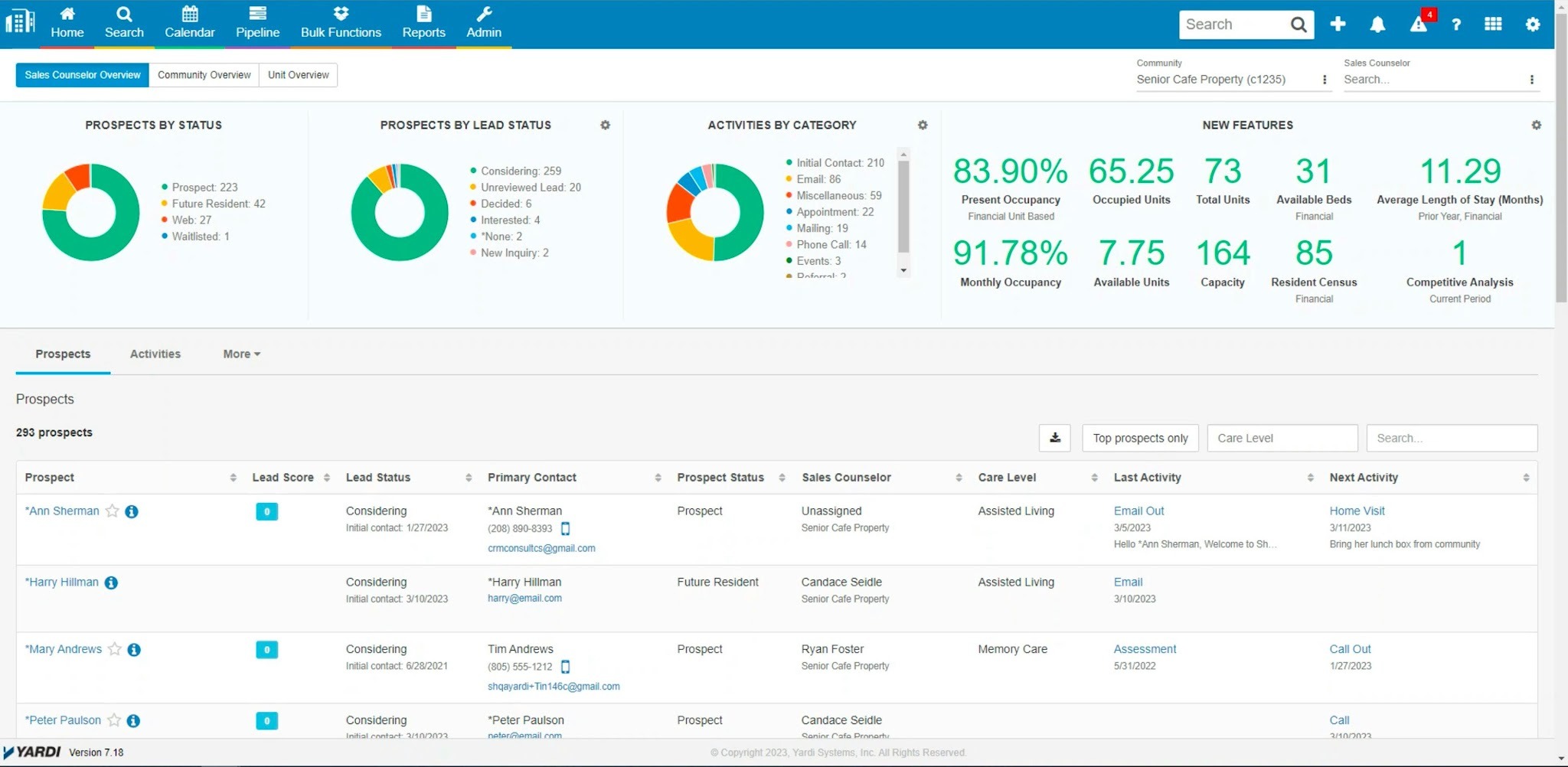
Yardi Voyager works if you run residential alongside commercial or affordable assets and your accounting requirements drive the decision. Facilities management sits inside the same platform as your general ledger, which for an owner reporting to investors usually settles the question by itself.
In monitoring terms it belongs in the same layer as AppFolio. It watches recorded activity across a larger and more varied portfolio, so mixed-use operators work from one database instead of three.
What you can do with Yardi Voyager
- Run maintenance beside the ledger: Work orders and facilities management share a database with leasing and accounting
- Hold several asset types together: Residential, commercial, affordable, and mixed-use properties operate in one platform
- Report at portfolio level: Reporting depth aims at asset managers and institutional stakeholders
- Work from any device: Browser-based access removes the local install
Yardi Voyager Pros and Cons
Pricing: Quoted per deal, based on portfolio size and modules.
4. HappyCo: Best for Inspections and Make-Ready Turns
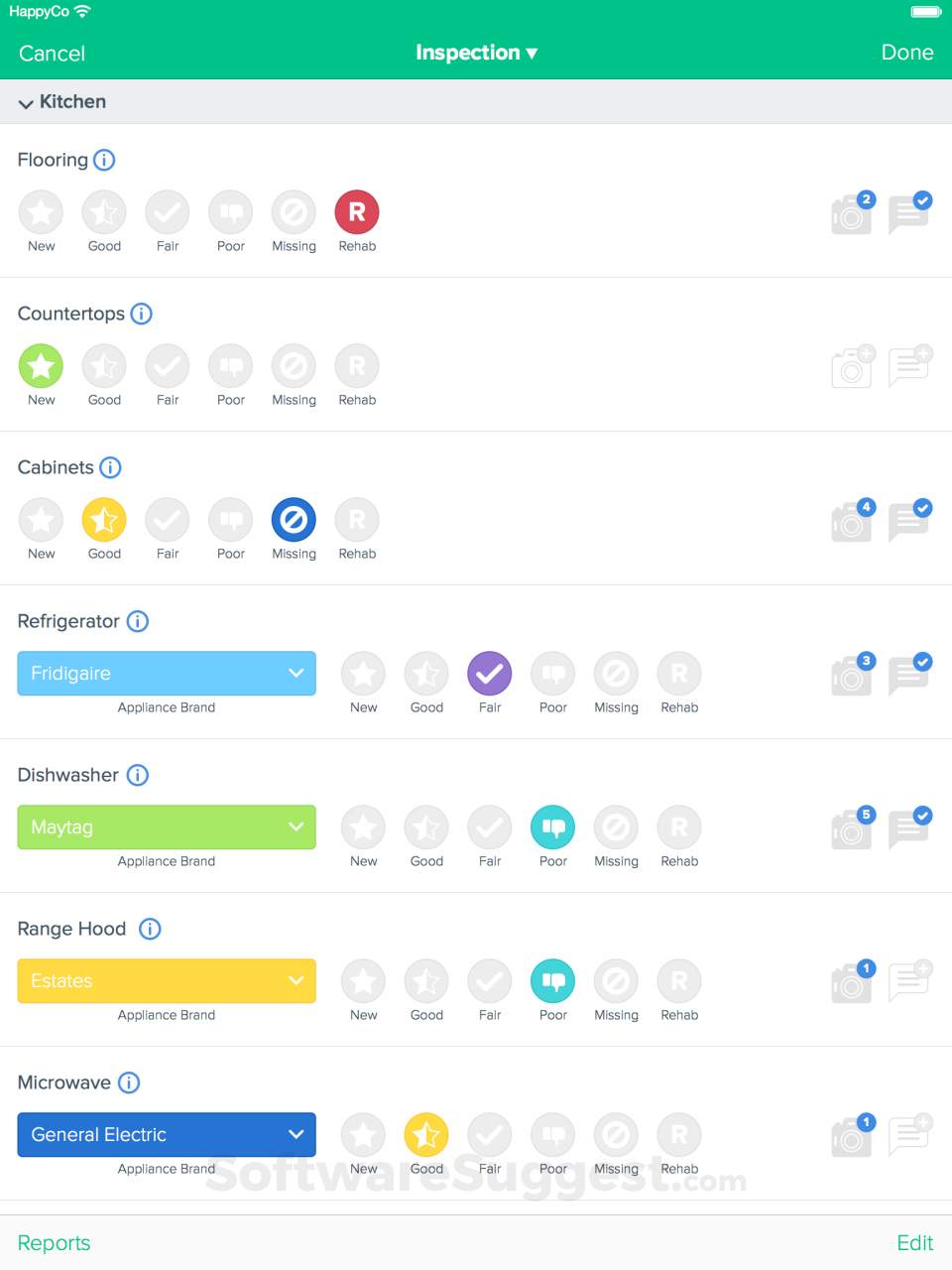
If you clear 500 units and your bottleneck is inspection consistency or turn time, HappyCo is a suitable option. It documents unit conditions across the resident lifecycle, covering move-in, move-out, periodic inspections, and the due diligence walks that happen when a property changes hands.
Time-stamped photos and digital signatures attach to each record. That evidence trail is what holds up in a deposit dispute, and what an asset manager asks for during an acquisition. Development since has pushed past inspections into the operations around them, so work orders and make-readies now run in the same system.
What you can do with HappyCo
- Inspect from a phone: One iOS and Android app carries required photos, comments, and offline capture for weak-signal buildings
- Standardize what gets recorded: Configurable templates set required photos and resident signatures per inspection type
- Watch turn progress centrally: A make-ready board holds each project alongside its tasks and inspections
- Inspect remotely: Live Inspections lets an off-site inspector join while your on-site operator supplies the video feed
- Trigger leasing automatically: Vacant-unit readiness pushes into leasing workflow once the turn completes
HappyCo Pros and Cons
Pricing: Per unit per month, quoted, with a 500-unit minimum. Enterprise pricing applies above that.
5. Enertiv: Best for Equipment-Level Energy and Capital Planning
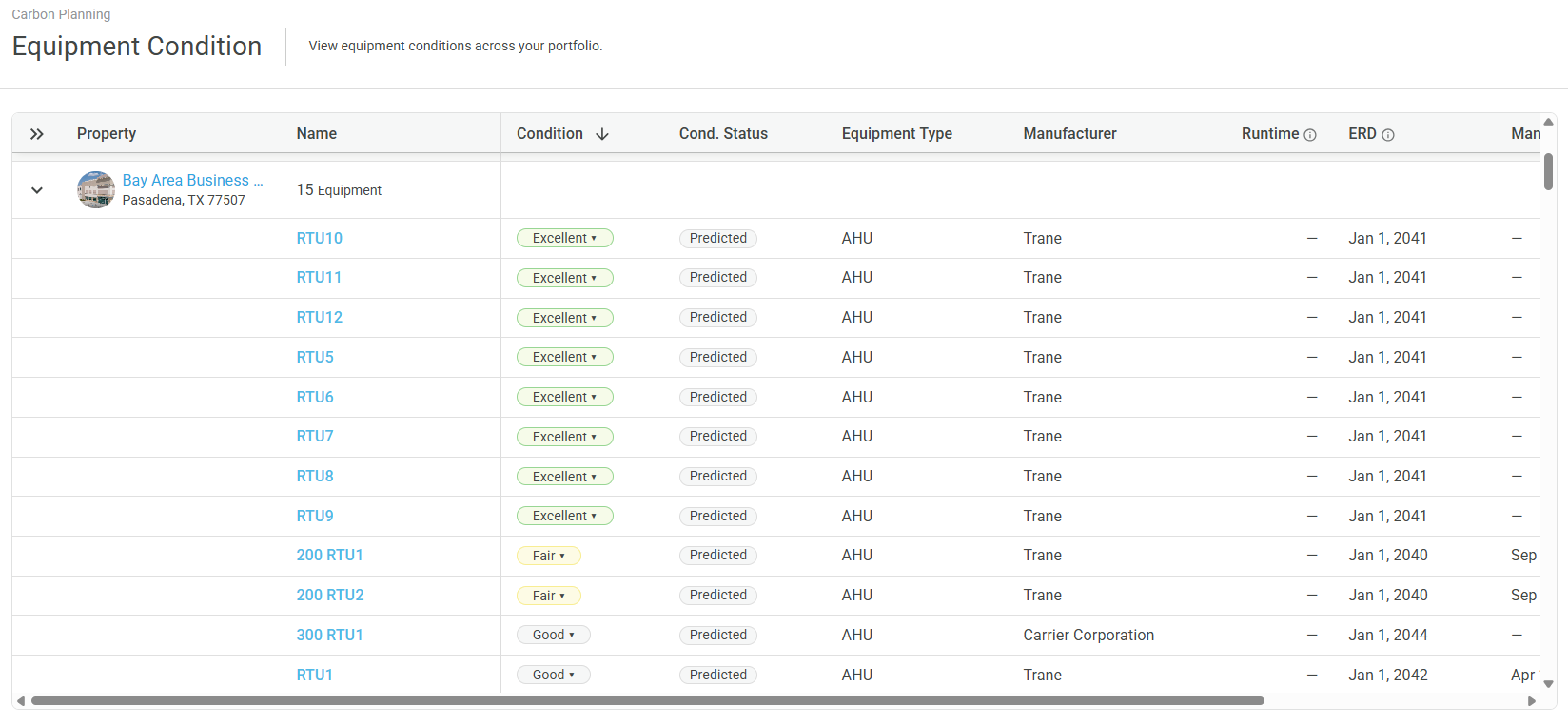
Enertiv sits in the same layer as SmartHQ™ Management while answering a different question. Fault monitoring tells you what needs fixing this week. Enertiv builds the multi-year view.
An on-site survey creates a digitized cloud inventory of your building equipment and in-unit appliances, tagged with nameplate data, images, and locations. Consumption patterns and equipment age then feed both capital planning and any sustainability reporting you owe.
However, Enertiv deploys dedicated cellular networks for its installations, so building Wi-Fi and IT involvement stay out of the equation. If your in-building coverage is weak or your network policies are restrictive, that removes an obstacle Wi-Fi-dependent platforms have to work around, though it means installing a separate sensor and connectivity layer rather than reading equipment you already own.
What you can do with Enertiv
- Inventory what you own: An on-site survey produces asset-tagged records carrying photos, equipment details, and location
- Catch anomalies on critical systems: Real-time monitoring covers equipment such as boilers and ventilation
- Act before failure: Predictive alerting flags equipment drifting outside its learned pattern
- Bill tenants accurately: Submetering captures consumption and automates the billing behind it
- Report to standard: Whole-building utility data exports in Energy Star and GRESB-ready format
Enertiv Pros and Cons
Pricing: Quoted after survey.
6. SmartRent: Best for In-Unit Smart Devices and Access
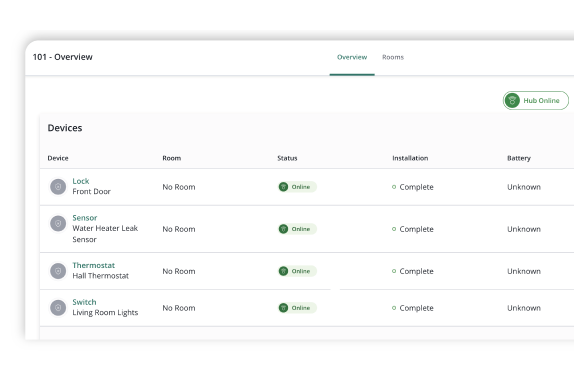
SmartRent manages connected hardware and physical access across communities, covering smart locks, thermostats, lighting, sensors, and the self-guided tour setup that lets a prospect walk a unit alone.
Move-in issues credentials and move-out revokes them, so your turn stops involving a locksmith. Since this is hardware, the buying process differs from software on this list. A site survey comes before a quote, and installing across an occupied property runs as a scheduled project.
What you can do with SmartRent
- Issue access in several formats: Mobile, PIN, card, and fob credentials cover residents, staff, and vendors
- Control the unit from one dashboard: Locks, hubs, thermostats, lighting, and plugs report into a single view
- Run tours without staff: Self-guided touring uses automated ID verification and geofenced access codes
- Retire rekeying: Credentials issue at move-in and revoke at move-out automatically
- Hold vacant units efficiently: Thermostat schedules for unoccupied units adjust remotely
SmartRent Pros and Cons
Pricing: Quoted per community after an on-site survey.
7. PointCentral: Best for Smart Home with Automatic Water Shutoff
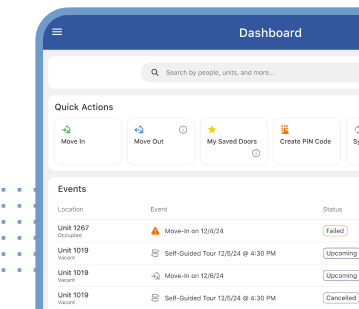
Part of Alarm.com, PointCentral differentiates on the water layer. Wireless leak sensors work alongside smart valves, so a detected leak triggers a shutoff rather than sitting in a notification queue at 2 am.
In a multi-story building where one plumbing failure reaches every floor below it, that difference carries the entire business case. A broader smart home offering sits around the water layer, which makes PointCentral a genuine alternative to SmartRent where water outranks turnover as your concern.
What you can do with PointCentral
- Stop a leak automatically: Wireless sensors pair to smart valves for shutoff without a call-out
- Track consumption: A smart water meter surfaces inefficiency at property level
- Manage entry: Smart locks and credentials cover units and common areas
- Hold temperature portfolio-wide: Thermostat management extends to vacant unit scheduling
- Tour without an app: Access codes arrive by text
PointCentral Pros and Cons
Pricing: Quoted per unit.
8. Alert Labs: Best for Water Monitoring in Low-Coverage Spaces
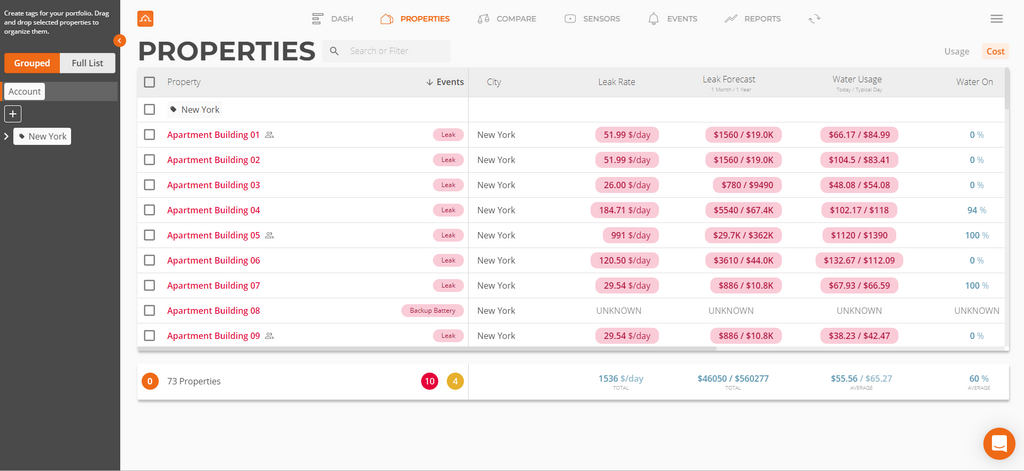
Alert Labs suits you if your highest water risk sits in basements and mechanical rooms where building Wi-Fi barely reaches. It handles one job thoroughly. Battery-operated leak detectors and flow sensors run on their own cellular network instead of your building's Wi-Fi, which solves the coverage problem that defeats Wi-Fi-dependent sensors in exactly the places water tends to appear.
Unusual-usage alerting sits alongside leak detection and often justifies the purchase on its own, since it explains a water bill your team has been arguing about for months.
What you can do with Alert Labs
- Deploy where power is scarce: Battery-operated detectors install without wiring
- Watch consumption as well as leaks: Flow sensors surface unusual usage at building and unit level
- Skip the IT conversation: Sensors connect over a dedicated cellular network instead of building Wi-Fi
- Scale across a portfolio: One platform covers thousands of units and buildings
- Document risk for insurers: Monitoring history supports water risk reporting
Alert Labs Pros and Cons
Pricing: Quoted by sensor count and portfolio size.
9. UpKeep: Best for Preventive Maintenance on Building Equipment
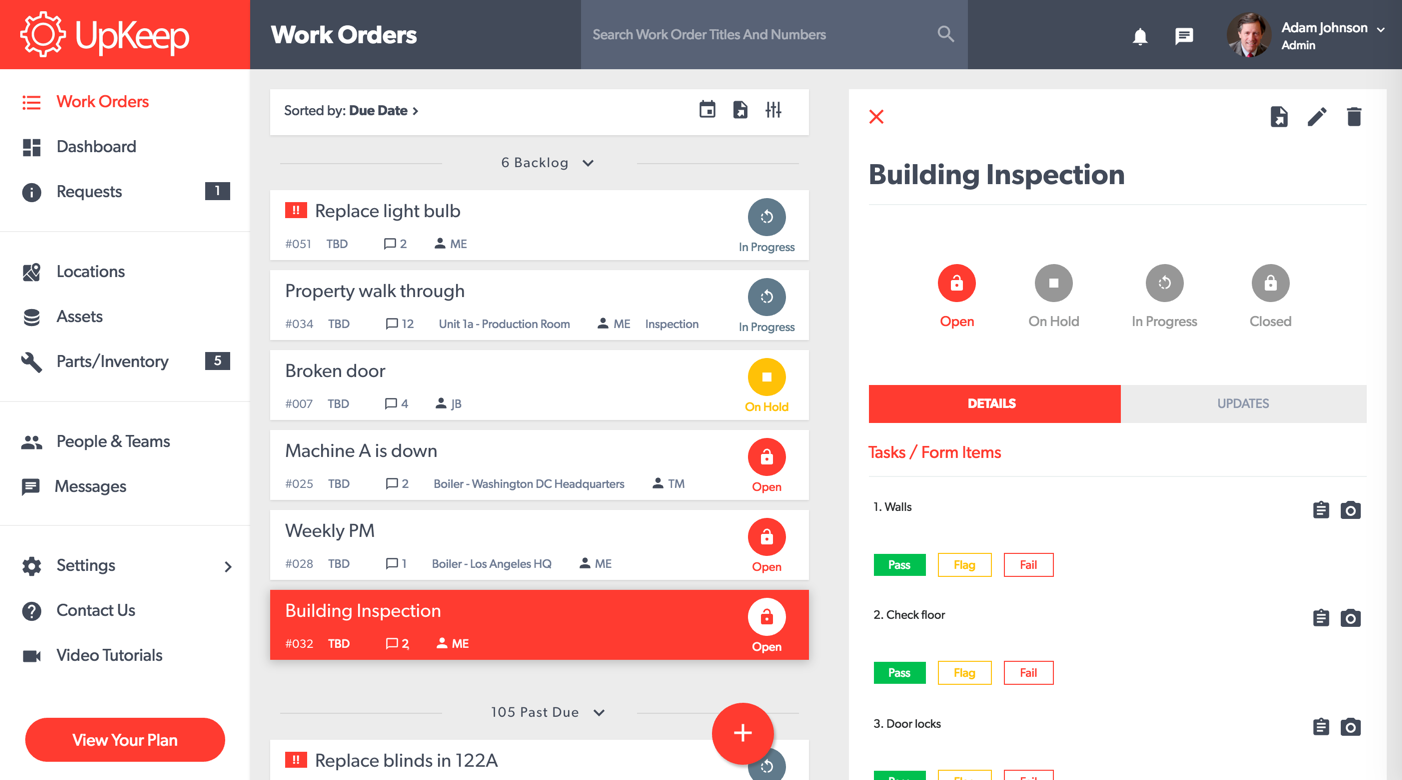
UpKeep is a good fit if your portfolio carries significant mechanical and common-area equipment needing scheduled servicing. It is a Computerized Maintenance Management System (CMMS) rather than a property platform, which makes it a better fit for boilers, pumps, and generators than for resident-facing workflows.
Where your maintenance runs on a calendar and attaches to specific assets, this is the shape of the tool that matches. It sits alongside your core platform rather than replacing it.
What you can do with UpKeep
- Schedule against the asset: Recurring work attaches to individual pieces of equipment
- Track downtime history: Service records and failure history build per asset over time
- Dispatch to phones: A technician-facing app carries photo and note capture
- Manage parts: Stock levels track against consumption
- Document for audits: Servicing history exports for compliance inspections
UpKeep Pros and Cons
Pricing: Per-user tiers. Essential ($24/user/month) and Premium ($55/user/month); Professional and Enterprise are custom quotes.
10. ButterflyMX: Best for Entry and Visitor Monitoring
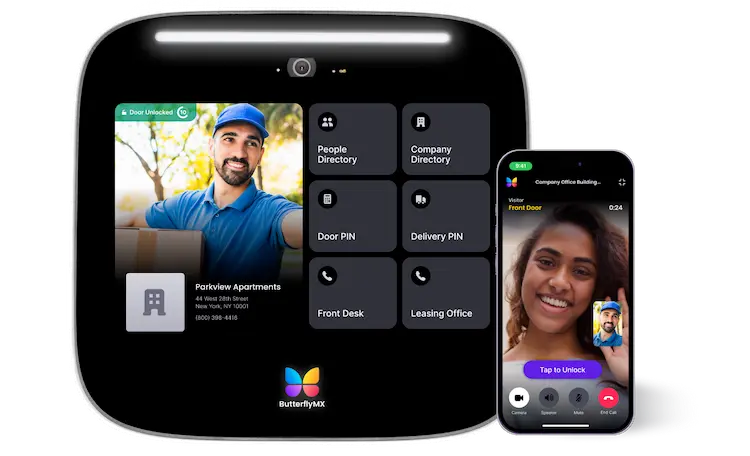
Built on cloud video intercoms, ButterflyMX has become one of the most recognizable names in multifamily visitor entry, and it watches a layer nothing else on this list touches.
Retrofit-friendly installation is the practical advantage in most buildings. Replacing an intercom in an occupied building usually turns into a wiring project; ButterflyMX avoids that in most cases, though buildings with unusable existing wiring may still need a full rewire.
What you can do with ButterflyMX
- Answer the door from anywhere: Video calls route from the entry panel to resident phones
- Give couriers time-limited access: Visitor and delivery credentials expire automatically
- Release the door from a phone: Resident mobile entry replaces the fob
- Keep a video record: Entry logs carry time-stamped photos attached
- Install without rewiring: Retrofit design suits occupied buildings
ButterflyMX Pros and Cons
Pricing: Hardware plus subscription, quoted per property.
How to Build Your Monitoring Stack Without Overbuying
10 services rarely means 10 subscriptions, and most portfolios settle at three or four. Four steps get you to the right number:
Step #1: Start with your core record
List the seven monitoring jobs and mark the ones your current platform handles to a standard your team accepts without workarounds. What stays unmarked becomes your candidate list, and it usually runs shorter than a vendor demo suggests.
Step #2: Check the network before you buy any connected layer
Confirm your band and coverage where equipment sits, then check your security type, since enterprise authentication and WPA3-only networks rule out more platforms than most operators expect. Find out whether a captive portal stands between devices and the internet, and whether your firewall passes the protocols involved.
Platforms running dedicated cellular or independent radio bypass the question entirely, which is a legitimate reason to prefer one. 15 minutes with IT before purchase saves a stalled rollout after.
Step #3: Ask whether the service creates work or only creates alerts
Alert fatigue is the most common failure mode in this category. A platform sending notifications nobody acts on has made your operation harder, because now somebody nominally owns a dashboard.
What earns its fee is a service turning a detected condition into an assigned task with an owner and a due date, inside a system your team already opens.
Step #4: Match the layer to your actual loss
Run last year's numbers. Water damage claims point you toward water monitoring. Emergency truck rolls and overtime point toward equipment condition. Units sitting vacant longer than they should point toward inspections and turns. Unplanned capital replacement points toward lifecycle data.
These categories look interchangeable in a demo and behave very differently in a budget.
Quick Shortlist by Portfolio Type
If you would rather skip the exercise, here is the condition that makes each service worth buying:
- Choose AppFolio if you run a professionally managed residential portfolio above 50 units and want your operational record with AI-assisted intake.
- Choose SmartHQ™ Management if your properties run connected GE Appliances and you want equipment faults and leaks alerting your team before residents report them.
- Choose Yardi Voyager if you operate across residential and commercial assets and accounting depth drives your requirement.
- Choose HappyCo if you clear 500 units and inspection documentation or make-ready turn time is your bottleneck.
- Choose Enertiv if you have to defend equipment replacement decisions to owners and need consumption and lifespan data to do it.
- Choose SmartRent if rekeying costs and in-unit device standardization justify a hardware project.
- Choose PointCentral if water damage is your largest claims exposure and you want shutoff rather than notification.
- Choose Alert Labs if your highest water risk sits where building coverage is weakest.
- Choose UpKeep if mechanical and common-area equipment needs asset-level preventive scheduling.
- Choose ButterflyMX if front-door operations and package handling create your daily friction.
Getting Your Monitoring Stack Right
Getting it right means matching the number of services to the number of jobs you actually have exposure to. Too few leaves layers unwatched, so your first notification arrives as a resident phone call. Too many leaves licences idle and alerts scattered across dashboards nobody consolidates, which produces the same phone call by a longer route.
Run the short exercise. List the seven jobs, mark what your current platform covers, confirm your network supports whichever connected layer you are considering, and check how each service returns work to the system your team already uses.
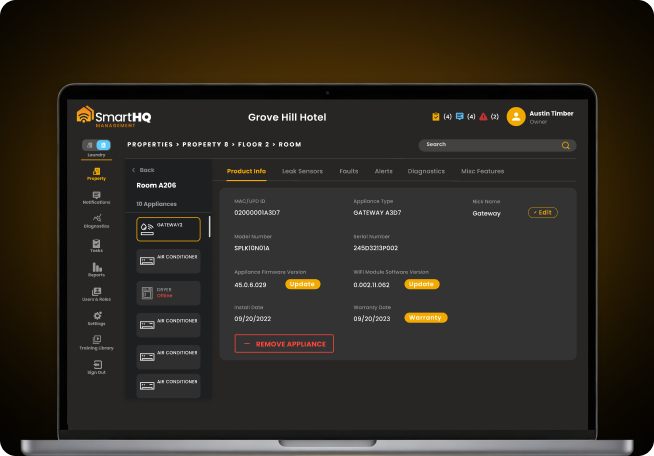
Still managing your entire appliance fleet without real-time visibility?
- Real-time monitoring and precision diagnostics across your portfolio
- Remote controls and batch commands without room-by-room visits
Portfolio-wide
appliance visibility
Real-time
monitoring & control