.png)
The GE Appliance Fault Code Guide for Technicians: Every Code by Appliance Type


Real-time leak monitoring
Free leak monitoring
TL;DR
- GE runs several code conventions across appliance types, and the format alone tells you which control platform you are looking at before you check a single definition.
- A code names the fault the control detected, which is not always the component that failed. Treat the code as a starting point and the model number as the final word.
- On an intermittent fault, stored history beats the display. The count and the last-event date are what tell you whether a problem is recurring or a one-off.
- SmartHQ™ Service reads active codes, stored history, and cycle logs straight off the appliance, and it keeps service documentation and parts ordering in the same place.
What is a GE Fault Code?
A GE fault code is a short alphanumeric signal that a GE appliance's control board produces when it detects a problem. The control watches its sensors and components while the appliance runs, and when a reading drifts outside the expected range, it logs a code and, on most models, puts it on the display.
Each code maps to a condition the control can see, such as a temperature sensor reading out of range or a motor that will not reach speed. However, that condition is not always the part that eventually needs replacing.
Two details decide how much weight a code carries:
- Its state, active on the display or stored in history.
- Its severity, which tells you whether the appliance is safe to keep running.
Since the same characters can mean different things across appliance types and control generations, the sections below organize every code by appliance and pair it with a severity and the symptom a customer is most likely to describe.
How to Read GE Fault Codes
A code on the display confirms that something failed. Working out which component failed is a second step, and that step is where service minutes disappear.
The usual sequence goes like this. You read the code, hunt for the manual or load a site on weak signal, cross-reference the model number, and hope the platform matches. 10 minutes are gone before you pick up a screwdriver.
That pressure keeps building. Home appliance repairers are still a small trade with limited projected growth, according to Bureau of Labor Statistics data, even as the connected install base grows. The workforce is aging too, with one 2026 market analysis putting the median age of certified US repair technicians at 47, which raises the value of a reference a newer technician can work straight from.
1. Three Code Conventions
Format tells you something before the definition does. GE controls use three broad conventions, and each one points toward a different generation of board:
- Letter-prefixed numeric codes (F1, E3, C4): The most common format. Range and oven controls lean on the F-series, washers and dryers use E-codes, and dishwashers split between C-codes and F-codes depending on the board.
- Two-letter codes (FF, PF, dE, tC): Common on refrigerators. Segmented displays render characters loosely, so a lowercase code can look like a different one from an angle.
- Bare numeric codes (26, 31, 63, 88): These turn up alongside lettered codes on some washer and refrigerator platforms, and their presence usually signals a different control generation.
2. Active Faults and Stored Faults
Every control holds two kinds of code, and they call for different handling. A code on the display is active, and a code in the control's history is stored.
Stored faults get overlooked far too often. One stored code means little on its own, but a count of forty with a last-event date from this morning describes an intermittent problem that is picking up speed.
Severity in the tables below runs on three levels:
- High means the appliance should stay out of service until it is repaired.
- Medium means it runs, but with degraded performance.
- Low covers nuisance conditions that often clear without a parts replacement.
GE Refrigerator Fault Codes
Refrigerator codes lead the field in misreads, for two reasons. Several of them look alike on a segmented display, and case carries real diagnostic meaning here.
Definitions also shift by control platform and model year, so identical characters can mean different things on a 2014 board and a 2023 board. Verify against the model number before you commit.
GE refrigerator fault codes with severity and presenting symptom
A few patterns are worth calling out here:
- Rendering pairs: DE and dE are separate faults, one at the door sensor and one in the defrost system, with case as the only tell. The same trap applies to tC against EC, and to tF against EF.
- Cooling clusters: FF, CC, E2 and E3 all reach the customer as a warm cabinet. What separates them is where the airflow path fails, so check the evaporator and condenser fans before you condemn the sealed system.
- Water path codes: E0, E4 and E5 sit downstream of the same supply. Verify inlet pressure and the valve screen before replacing an ice maker assembly.
GE Washer Fault Codes
Washer codes come in two formats, and the format identifies the platform. E-series codes and bare numeric codes rarely share a board.
Two failure families cover most washer calls. One is the fill and drain path, the other is the drive system, and symptoms overlap heavily inside each family.
GE washer fault codes grouped by code series
- Fill faults follow a sequence: E30, E31 and 35 all present as a fill problem while failing at separate points. Rule out supply, then flow measurement, then level sensing, in that order.
- Drive codes travel together: E41, E42, E43 and E45 all point at the drive system, and they cascade often. When several show at once, work the earliest fault chronologically.
GE Dryer Fault Codes
Dryer faults get misdiagnosed more than any other category, because three separate conditions reach the customer identically. Wet clothes at cycle end fit a sensor fault, a heat fault, and an airflow fault equally well.
Airflow sits underneath most of them. A restriction raises operating temperature, which eventually opens the thermal cutoff, so the code you read is often two steps downstream of the cause.
GE dryer fault codes with severity and presenting symptom
- Airflow first: E4, E6 and AF all sit downstream of a restriction. Replace an E4 fuse while the vent stays blocked and you buy about a month before the same call comes back.
- Two thermistor faults: E3 is the sensor itself, and tS is the communication path to it. Check continuity at the sensor before you condemn the board.
- Mechanical against electrical: E5 and E1 both stop the drum, one through the drive system and one through the door circuit. Spin the drum by hand to tell them apart in under a minute.
GE Dishwasher Fault Codes
Dishwasher codes split across two conventions, with C-series codes on one control generation and F-series codes elsewhere. Water level and drainage account for most of the high-severity set.
Symptom overlap runs high here. A stalled fill, a stuck float, and a blocked drain all reach the customer as a machine that will not finish its cycle.
GE dishwasher fault codes grouped by code series
- Water level from both directions: C7 and H2O describe opposite problems, a float switch fault against a supply shortfall. Confirm the supply line and inlet screen before you open the float assembly.
- Drainage overlap: F5 and C4 look identical to the customer, with standing water in the tub. Which code shows tells you the board generation as much as the failed part.
- Fill valve against supply: F3 and H2O both stop water reaching the tub. Check static pressure at the supply before you replace a valve.
GE Range and Oven Fault Codes
The range F-series runs longer than any other category, and the temperature sensor codes drive the most unnecessary board replacements. Five separate codes point at the same sensor circuit.
Self-clean operation generates its own cluster. Overtemperature conditions and door lock faults both surface during or after a clean cycle, and both carry safety weight.
GE range and oven fault codes with severity and presenting symptom
- The sensor cluster: F1, F4, F10, F11, and F13 are all associated with the temperature-sensor circuit. F4 and F13 read as open circuits, while F11 reads as a short. Before touching the board, measure the sensor resistance at room temperature and compare it with the specified value.
- Safety rows: F7 and F8 both relate to self-clean operation, one through overtemperature and one through a lock that stays engaged. Resolve the underlying cause before you return the appliance to service.
- Check the lock first: LOC is an active control lock. Confirm the lock state before you diagnose an unresponsive panel.
Reading Codes Without the Manual Lookup
Every table here supports a manual lookup, and a lookup only tells you what the display shows right now. On an intermittent fault, the history that would actually crack the case sits behind service mode, out of reach until you stop and dig for it.
SmartHQ™ Service skips that step. Connect the module to the appliance, open the app, and the fault data comes straight off the control board: active codes, stored history with counts and last-event dates, and full cycle logs. The same screen carries the service documentation for that exact model, lets you run service-mode tests and toggle individual components, and keeps parts ordering in the session instead of a separate catalog. It reads GE Appliances built from 2012 on, so that view covers most of what you meet in the field.
Manual code lookup compared with connected diagnostics across five dimensions
What a Fault Code Leaves Out
A code names the condition the control detected, which sometimes sits downstream of the actual failure. Four patterns account for most of the gap:
- Cascading codes: One failure triggers others, so a motor control fault throws speed and rotor position codes alongside it. Work the earliest fault chronologically, not the loudest one on the display.
- Codes that clear on power cycle: An intermittent fault that vanishes when the customer unplugs the unit has been hidden, not repaired. Stored history covers this case where the live display falls short.
- Symptom codes against component codes: A blown dryer thermal fuse is a real fault, but restricted airflow is what opened it. Fix the condition that killed the part.
- Platform drift: Definitions change between control generations. When one conflicts with the symptom in front of you, verify against the model number before you order.
How Should You Work an Unfamiliar Code?
Four steps handle most unfamiliar codes without guesswork, and each one narrows the field before any parts decision.
Step 1: Confirm What You Are Reading
Read the display straight on, especially on segmented refrigerator panels. Case and character shape both carry meaning, so settle those first.
Step 2: Identify the Code Convention
Format points at the platform. An E-series code and a bare numeric code belong to separate control generations, and that changes the code set that applies.
Step 3: Pull the Fault History
Check the count alongside the last-event date. A single occurrence and a recurring fault call for different repairs, even when the characters match.
Step 4: Separate the Symptom From the Component
Ask which condition would produce this code. Airflow, supply, and drainage problems all surface as component codes further down the chain.
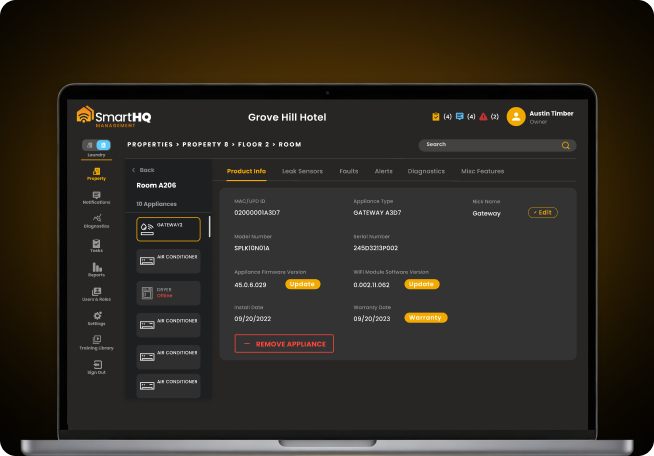
Still troubleshooting laundry equipment by trial and error?
- Real-time fault codes read straight from the appliance
- Isolated component testing without a full teardown
Portfolio-wide
leak monitoring