.png)
How Hotel Maintenance Software Can Speed Up Appliance Service

TL;DR
- Hotel maintenance teams lose time before a repair starts, because staff must work out which appliance failed, where it is, what the fault was, and who owns the next step. Maintenance software cuts that delay by putting equipment details, tasks, service history, and response steps into one shared view.
- The workflow has six steps: receive the appliance alert, review fault and appliance details, choose the right response, assign and track a task, use remote controls for setting problems, and schedule professional service when on-site staff cannot finish the repair. Clear escalation rules keep minor alerts from creating unnecessary work.
- Connected tools do not replace technicians or guarantee fewer breakdowns. Leaks, hardware faults, installation problems, and safety concerns still need on-site inspection and repair. The gain is faster information: less time locating basics, clearer task ownership, and quicker routing of serious issues to the right person.
- SmartHQ™ Management helps hotel teams turn appliance alerts into tasks with an owner, priority, due date, and notes, while remote controls and batch commands handle setting changes without room-by-room visits.
Hotel maintenance teams often lose time before the repair even begins.
A guest reports a comfort problem. The front desk contacts engineering. The team identifies the affected appliance, searches for equipment information, assigns the work, and decides whether outside service is required.
Hotel maintenance software can reduce these delays by connecting equipment information, maintenance tasks, service history, and response workflows.
SmartHQ™ Management supports this process as a connected appliance management platform for compatible GE Appliances. It gives hotel teams access to appliance alerts, fault information, remote controls, maintenance tasks, and service scheduling from one dashboard.
What is hotel maintenance software?
Hotel maintenance software helps engineering, facilities, and operations teams organize equipment information, maintenance tasks, service records, and repair workflows.
The capabilities vary by platform. A full maintenance system may manage inspections, labor, inventory, vendors, and every asset across the property.
SmartHQ™ Management serves a more focused role. It connects compatible GE Appliances and helps property teams monitor, control, maintain, and report on those appliances across rooms, floors, buildings, and properties. Its approved category is a connected appliance management platform.
Why does hotel appliance maintenance get delayed?
Many maintenance delays start with missing information rather than difficult repairs.
The hotel team may not immediately know:
- Which appliance needs attention
- Where the appliance is located
- What fault occurred
- When the issue started
- Whether the room remains usable
- Who owns the next step
- Whether the issue needs internal or professional service
When these details live across calls, messages, work orders, and separate systems, staff must rebuild the situation before they can act.
A connected property maintenance workflow gives the team one shared view of the appliance, issue, location, assigned task, and service activity.
How can hotel maintenance software speed up appliance service?
Hotel teams can speed up appliance service by detecting issues earlier, reviewing available equipment information before dispatch, assigning clear ownership, using remote controls where appropriate, and scheduling professional service when on-site teams cannot complete the repair.
A practical workflow follows six steps.
1. Receive the appliance alert
Traditional maintenance often begins after a guest reports a problem.
Connected appliances can provide earlier visibility into certain faults and operating conditions. SmartHQ™ Management shows fault codes, definitions, counts, timestamps, and supported appliance readings through its dashboard. Compatible GE leak sensors can also send app or email notifications when moisture is detected.
Earlier visibility can help hotel teams:
- Review an issue before dispatching staff
- Locate the affected room or appliance
- Prioritize urgent maintenance work
- Identify recurring faults
- Respond sooner to potential leaks
An appliance alert does not replace physical inspection or professional diagnosis. It provides information that can help the team select the next step.
For leak events, earlier alerts may help teams respond sooner and reduce the potential severity of water damage. They cannot guarantee damage prevention.
2. Review appliance and fault information
An alert is more useful when it includes context.
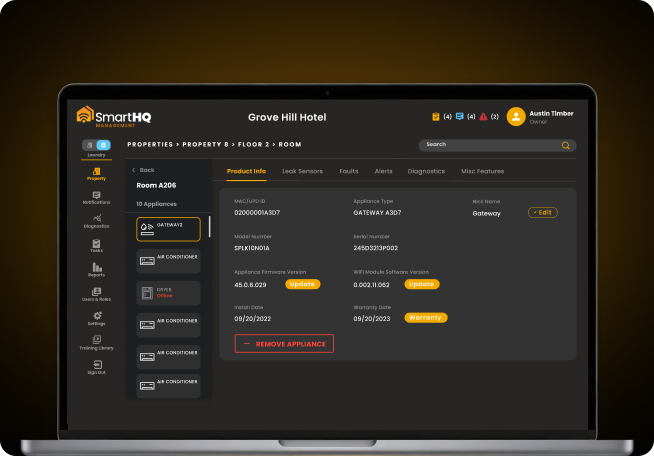
SmartHQ™ Management gives authorized users access to available readings, diagnostic steps, model and serial information, fault history, manuals, and product details for supported connected appliances.
Before dispatching someone, the team can review:
- Appliance location
- Appliance type
- Model and serial number
- Fault code and definition
- Alert date and time
- Available operating readings
- Previous faults
- Maintenance notes
- Warranty or product information
This information can reduce initial troubleshooting and help the technician prepare before entering the room.
It does not guarantee that the issue can be diagnosed remotely or repaired during the first visit.
3. Determine the right response
Not every appliance alert requires the same action.
The hotel team should determine whether the issue requires:
- Remote review
- A setting change
- A room inspection
- A maintenance task
- A safety escalation
- Professional appliance service
For example, an incorrect setting may require a different response than a fan fault, active leak, disconnected appliance, or hardware failure.
Clear escalation rules prevent minor alerts from creating unnecessary work. They also help serious issues reach the right person faster.
4. Assign and track the maintenance task
Visibility does not help when ownership remains unclear.
SmartHQ™ Management allows property teams to create, assign, prioritize, and track maintenance tasks. Teams can also retain notes, priorities, and service records within the system.
A useful maintenance task should contain:
- Room and appliance location
- Appliance information
- Fault or alert details
- Priority
- Assigned team member
- Due date
- Access instructions
- Required follow-up
- Resolution notes
Clear task ownership reduces the chance that an alert remains visible but untouched.
It also helps managers review open work, completed work, and recurring issues across the property.
5. Use remote controls where appropriate
Some appliance issues involve settings rather than failed components.
For supported appliances, SmartHQ™ Management allows authorized users to view and adjust selected settings remotely. Teams can also use Batch Command capabilities to update temperature, mode, power, fan settings, software, or firmware across supported groups of appliances.
Remote controls may help teams:
- Correct approved settings
- Prepare vacant rooms
- Apply consistent property standards
- Reset supported configurations
- Update multiple appliances together
Remote appliance management does not replace technicians.
Leaks, hardware faults, installation issues, safety concerns, and physical damage still require appropriate on-site inspection and repair.
6. Schedule professional appliance service
Some repairs exceed the capacity, responsibility, or availability of the hotel’s on-site team.
SmartHQ™ Management connects with Bodewell for professional appliance service scheduling. Property teams can move from an appliance alert to service scheduling through the platform when outside assistance is required.
What information should an appliance maintenance alert include?
A useful appliance alert should help the team decide what to do next.
The alert or linked task should include:
- Property, building, floor, and room
- Appliance type
- Model and serial number
- Fault code or alert description
- Event timestamp
- Available equipment readings
- Maintenance history
- Assigned owner
- Priority and due date
- Required escalation path
The goal is not to provide every technical answer inside the alert.
The goal is to reduce the time spent locating basic information.
What is remote appliance monitoring?
Remote appliance monitoring gives authorized teams access to the status, faults, settings, and activity of compatible connected appliances.
It can help hotel maintenance teams identify certain issues, review available equipment information, and prepare before entering a room.
Remote monitoring does not detect every possible problem. It also does not replace physical inspection when the issue involves hardware, water, installation, or safety.
Can appliance fault alerts prevent breakdowns?
No alert system can prevent every appliance breakdown.
Appliance fault alerts can provide earlier visibility into certain faults or changes. That information may help teams prioritize work, investigate the issue sooner, and reduce delays caused by manual reporting.
The outcome still depends on the fault, the equipment condition, the response process, and the repair required.
Does hotel maintenance software replace technicians?
No.
Hotel maintenance software supports technicians by organizing equipment information, alerts, work assignments, records, and service workflows.
Connected appliance tools can also provide fault information and selected remote controls. Physical repairs, leaks, installation problems, and safety concerns still require qualified inspection and service.
What does SmartHQ™ Management require?
SmartHQ™ Management depends on compatible connected GE Appliances, an appropriate account structure, and supported property connectivity.
Before deployment, hotel teams should:
- Confirm connectivity in required appliance locations.
- Review current SmartHQ™ Management technical requirements.
- Create the property, building, floor, and room structure.
- Define user roles and permissions.
- Commission supported appliances through the mobile app.
- Test alert and task workflows.
- Document escalation procedures.
The current platform supports site-wide 2.4 GHz Wi-Fi, supported network-security requirements, mobile commissioning, role-based access, and property organization by building, floor, and room.
Keep detailed network specifications on the technical requirements page rather than repeating them inside this article.
Build a faster appliance maintenance workflow
Hotel teams cannot prevent every appliance fault.
They can reduce the delays created by manual reporting, incomplete equipment information, unclear task ownership, and disconnected service processes.
SmartHQ™ Management connects appliance visibility, fault information, remote controls, maintenance tasks, asset records, and Bodewell service scheduling for compatible connected GE Appliances.
The result is a clearer path from the first alert to the appropriate service response.
Explore the 90-day SmartHQ™ Management trial and see how connected appliance management fits your hotel maintenance workflow.
Still managing your entire appliance fleet without real-time visibility?
- Real-time monitoring and precision diagnostics across your portfolio
- Remote controls and batch commands without room-by-room visits
Portfolio-wide
appliance visibility
Real-time
monitoring & control