.png)
IoT in Property Management: How It Works and Why It Matters

.png)
TL;DR
- IoT in property management means equipment and sensors that report their own condition over a network, instead of a resident being the first to notice something is wrong. A reading moves from a device, through a network, into a platform that decides whether it's worth acting on.
- Energy reporting shows what individual units are using before it shows up as a building-level bill, leak detection catches water while it's still a drip, and your team can turn a fault into an assigned job instead of a missed alert.
- Repairs rarely drive the cost. The gap between a failure starting and someone finding out does, and catching it early usually turns an emergency call into a scheduled one.
- SmartHQ™ Management can help property teams put these capabilities into practice. Connected GE Appliances and PTAC or VTAC units can report fault codes over a property's existing Wi-Fi, with leak alerts where GE sensors are installed. Your team can turn alerts into tasks with an owner and due date, while tracking energy use separately in reports.
Picture a wall unit on the third floor that’s been cycling on a compressor fault for six days. Nothing about it has surfaced as a visible symptom or a service request yet, so the facilities team has no way to know. The first sign might be a resident calling the front desk during a heatwave.
By then, what could have been a routine repair can become a same-day emergency dispatch, with a frustrated tenant and a technician diagnosing a problem that has been developing for most of a week.
Internet of Things (IoT) can help property teams identify equipment issues earlier. Instead of waiting for a resident to report a problem or for the failure to become apparent, connected equipment can surface potential issues while there is still time to assess them and schedule maintenance.
This guide explains what IoT means in property management, how the technology works together, and where it supports daily operations, from energy monitoring and leak detection to turning alerts into assigned work that teams can track and manage.
What IoT in Property Management Means
IoT in property management means physical equipment, sensors, and appliances that connect to a network and report data about their own condition, rather than sitting silent until something breaks and somebody notices.
In practice, this means connecting the equipment and systems a facility manager already monitors every day. A PTAC unit that reports whether it is running normally or throwing a fault code. A sensor mounted near a water heater that knows the difference between dry and wet. A meter that tracks how much power an appliance is drawing this week compared to last.
Compare that to how most buildings still operate. A technician walks a property on a schedule and checks what is visible. A resident files a ticket when something stops working. Both depend on a person noticing a problem after it has already started. IoT moves that detection earlier, to the moment the equipment itself first shows a sign of trouble.
How It Works: Sensors, Connectivity, and the Platform
Three things have to happen for IoT to work in a building. A device has to generate a reading. A network has to carry that reading somewhere. A platform has to decide what the reading means. Miss any one of the three and the setup stops short of useful.
1. Sensors and connected equipment
This is where the data starts. Appliances like washers, dryers, and water heaters can report their own status. HVAC and PTAC units report whether they are running, what mode they are in, and whether a fault code has triggered.
Dedicated sensors handle jobs a standard appliance was never built to do, such as detecting moisture near a supply line. Each device is narrow in what it reports, which is exactly why a building typically runs several kinds together.
2. The network connecting them
A reading is worthless if it stays on the device. Most equipment in a property connects over the building's existing Wi-Fi, which keeps the rollout simple since nothing new has to be installed beyond the devices themselves.
For SmartHQ™ Management specifically, that means site-wide 2.4 GHz Wi-Fi reaching at least -85 dB at appliance locations, IPv4 addressing, and WPA or WPA2-PSK security. WPA3-only and WPA2-Enterprise networks aren't supported. Commissioning takes a mobile device, and leak detection needs GE's sensors and a gateway installed.
Some deployments use cellular or another independent radio network instead, particularly where Wi-Fi coverage is weak in mechanical rooms or basements. Neither approach is universally better. The right one depends on what a building's network already looks like, and that is worth checking before committing to either.
3. The platform that turns data into action
A raw reading may not tell a facilities team what action to take. A platform is what interprets it, compares it against what normal looks like, and decides whether a person needs to know. This is the step most explanations of IoT skip past, treating the sensor as the whole story. In practice, the sensor is only the input.
The output that matters to a facility team is an alert that gets seen, and ideally a task that gets assigned, rather than a data point sitting in a log nobody opens.
Why It Matters for Property and Facility Managers
Early detection can reduce the likelihood that a minor equipment problem becomes an urgent, more disruptive repair. The actual cost impact depends on the fault, the equipment's condition, and how fast the team responds.
A fault caught on day one is a scheduled visit. The same fault caught on day six, after a resident complaint, is an emergency call, a technician working without much lead time, and often a repair that has grown more expensive while it sat unnoticed. Shrinking that window is the single biggest effect IoT has on day-to-day operations.
The second effect is a shift from reactive maintenance to something closer to scheduled maintenance, because a platform showing which units are throwing recurring faults gives a facilities team a reason to service equipment before it fails outright, not just after. And the third is visibility at the scale a portfolio actually operates at. Walking every building on a rotation stops working once a portfolio reaches a few hundred doors spread across several properties, and that is precisely the scale where equipment starts failing in the gaps between visits.
How IoT Helps Property Teams Catch Problems and Act Sooner
IoT is most useful when it helps teams identify operational issues before they become more expensive or disruptive. These three use cases show how connected equipment and sensors can support earlier detection and a faster response.
1. See Where Energy Is Going Before It Shows Up on a Bill
Energy monitoring means being able to see how much power individual equipment is using, rather than only seeing a building-level total once a month.
A connected HVAC unit or appliance reports its own usage, so a facility manager can look at one unit next to its neighbors instead of at a single utility bill covering an entire property. That granularity is what makes the data useful. A manager reviewing energy reports can see which units are running longer, drawing more for the same output, or behaving differently from comparable equipment elsewhere in the portfolio, and decide whether any of it is worth a closer look.
The same reports support decisions that go beyond a single repair. Comparing consumption across a portfolio can help a team see which units may be aging out faster than others, which informs a capital replacement plan rather than waiting for a breakdown to force the decision.
Separately from reporting, some platforms let a team act on that picture directly, by setting temperature limits or pushing settings to a group of units at once. Reporting shows you where usage is concentrated; controls are how you do something about it.
2. Catch Leaks Before They Cause Major Water Damage
Leak detection means sensing moisture at the point where a leak is likely to start, before it travels far enough to cause visible damage.
A sensor placed near a washing machine supply line, a water heater, or a dishwasher connection is built to notice water where water should not be. The moment moisture reaches it, an alert goes out, often while the leak is still a drip rather than a flood. That timing is the entire point. Water damage compounds quickly once it spreads past a single unit, reaching flooring, drywall, and the ceiling of whatever sits below.
3. Turn Equipment Alerts Into Actionable Maintenance Tasks
Task automation means an alert does not stop at a notification. A team member turns it into a task with an owner, a location, and a deadline attached, inside the system a maintenance team already uses.
The difference matters more than it sounds like it should. A notification tells somebody that something happened. A task tells somebody what to do about it, who is responsible, and by when. Without that second step, alerts pile up in an inbox or a dashboard nobody has time to check, and the detection advantage IoT is supposed to provide gets lost in the handoff between the sensor and the person who could actually act on it.
This distinction matters more at portfolio scale than it does in a single building. One property manager watching one building can absorb a flood of individual notifications and still keep track of what needs attention. A team responsible for several hundred units across multiple properties cannot, not without a system that filters alerts and tracks assigned work in one place. That is what the next section shows in practice.
SmartHQ™ Management: IoT Applied to Appliances and HVAC
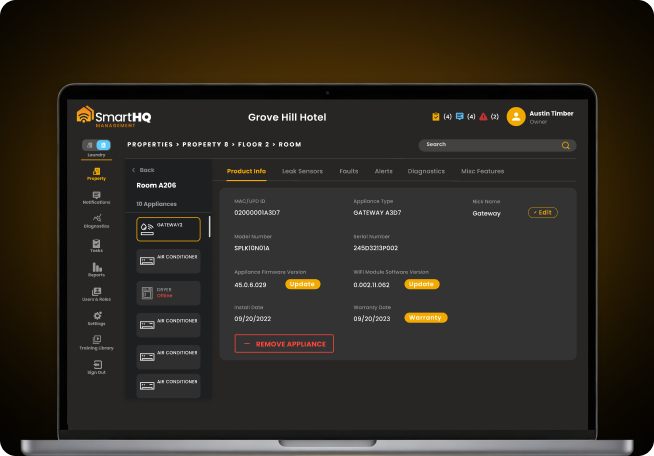
SmartHQ™ Management is a platform for monitoring and managing connected GE Appliances and Zoneline PTAC or VTAC units across a property portfolio, and it is a working example of the three-part chain described earlier.

The sensors are the appliances themselves. Connected GE Appliances and Zoneline PTAC or VTAC units report their own status, including fault codes, firmware currency, and energy draw. The network is the property's existing Wi-Fi, so a building does not need new infrastructure beyond the connected equipment it already runs.
The platform is the SmartHQ™ Management dashboard, where those readings turn into something a facilities team can act on.
You can see how that plays out against each use case already covered. Energy management controls let you set temperature limits and adjust settings across a fleet of units at once, rather than walking room to room.
Leak sensors paired with a gateway send an alert the moment moisture reaches them, covering the same detection window described above. Your team can turn a fault code into a task scoped to a specific property, building, floor, and room, with an owner and a due date attached, so an alert does not sit unread while a unit keeps cycling on the same fault.
What you can do with SmartHQ™ Management
- Catch a fault before a resident does: Advanced Diagnostics shows which fault is recurring, on how many appliances, and how recently
- Act on a leak while it is still small: Paired sensors and gateways trigger an alert the moment moisture is detected
- Turn an alert into assigned work: Create a task scoped to a specific room, with an owner and a due date, rather than leaving a notification unread
- Adjust settings across a fleet at once: Batch Command applies firmware updates, power controls, and temperature and mode changes without a room-by-room visit
However, coverage applies to connected, Wi-Fi-enabled GE Appliances, so equipment from other manufacturers or units that were never connected sit outside what the platform can see. Leak detection specifically needs GE sensor and gateway hardware installed, the alerting itself is part of the platform, but the hardware is not optional.
Pricing: Contact sales for current pricing. SmartHQ™ Management also offers a free 90-day trial.
What to Check Before You Adopt IoT
Before choosing any IoT platform for property management, check what your building's network can support, since that decides whether a rollout takes a week or turns into a much longer project.
Start with coverage and security. Confirm the band, signal strength, and security type at the locations where equipment sits. Enterprise authentication and networks with limited security options rule out more platforms than most facility managers expect going in.
Next, ask whether an alert becomes assigned work or just sits as a notification. A platform that only notifies has moved the problem, not solved it, because somebody now has to remember to check a dashboard on top of everything else on their plate.
Finally, take stock of what is already connected versus what would need to change. Some properties are closer to ready than they realize, since appliances installed in the last few years are often IoT-capable already, while others may need equipment upgrades before any of this becomes possible.
Getting Started
The mechanism underneath all of this stays the same regardless of which platform or which piece of equipment is involved. A sensor takes a reading, a network carries it, and a platform decides what to do with it. Getting IoT right in a property comes down to choosing tools where that last step, turning a reading into action, actually happens.
If you want to see what that looks like against a real property structure, the demo above walks through diagnostics, leak alerting, and task assignment on an account built around your own buildings.
Still managing your entire appliance fleet without real-time visibility?
- Real-time monitoring and precision diagnostics across your portfolio
- Remote controls and batch commands without room-by-room visits
Portfolio-wide
appliance visibility
Real-time
monitoring & control