.png)
What Is Proptech? A Complete Guide to Property Technology in 2026

TL;DR
- Proptech combines software, connected hardware, and data services that support property transactions, operations, maintenance, and resident experiences.
- Market estimates place global proptech at $50.1 billion or $53.24 billion in 2026, depending on scope and methodology.
- Key categories include IoT and BMS, ESG and energy, leasing, smart access, and connected operations.
- Strong use cases connect a physical signal to a clear decision, assigned task, and documented response.
- SmartHQ™ Management gives property teams appliance monitoring, diagnostics, reports, alerts, and task management in one workspace.
What is Proptech?
Proptech is technology designed for real estate and the built environment. The category includes software, sensors, connected equipment, analytics, and digital workflows that improve how property assets are bought, leased, operated, serviced, or maintained.
A listing portal is proptech. So is a digital leasing platform, smart access system, energy-monitoring tool, building management system, or connected appliance platform. The common thread is a direct connection to property work. The technology helps someone make a decision about a building, unit, tenant relationship, physical asset, or service event.
The term covers a wide market, so category boundaries vary. One market report may include software and related services across the real estate lifecycle. Another may include a wider set of connected building technologies. Mordor Intelligence defines its market around revenue from software platforms and related services that digitize stages of the real estate lifecycle. Research and Markets defines proptech as software and technology that improves real estate industry efficiency.
That difference explains why market estimates vary. Grand View Research reports a global market size of $50.1 billion for 2026 and projects $115.0 billion by 2033, at a 12.6% CAGR. Mordor Intelligence estimates $53.24 billion in 2026 and $120.74 billion by 2031, at a 17.79% CAGR. Research and Markets reports $42.1 billion in 2024 and projects $104 billion by 2030, at a 16.3% CAGR.
These figures describe different research scopes. They provide market context, not a single definitive total. The consistent signal is stronger investment in software, connected systems, and data-led property operations.
How proptech developed
The first generation digitized property records and listings. Teams gained searchable databases, online marketing channels, and electronic financial workflows.
Cloud software expanded the second generation. Property teams gained browser-based maintenance systems, resident portals, digital applications, and online lease processes. Those tools improved access to information and reduced manual administration.
Connected systems define the current phase. Sensors and equipment can send operating signals into software. Teams can review conditions remotely, create a task, or adjust an approved setting from a central workspace. The value comes from the connection between the signal and the response.
What Are the Main Proptech Categories?
Proptech categories reflect the property lifecycle, from attracting an occupant to operating the asset. The categories overlap, but each solves a different operational problem.
Proptech categories grouped by the work they support, with examples of common technologies and users.
IoT and building management systems
Internet of Things, or IoT, devices collect data from physical spaces and equipment. A sensor may measure temperature, humidity, occupancy, water presence, vibration, or energy use. A building management system brings selected building controls and signals into a management interface.
IoT and BMS tools help teams see conditions across a property. A facility manager can review equipment status, identify a temperature deviation, or assign follow-up work. A portfolio operator can compare building conditions across sites when the system captures consistent data.
The deployment question matters as much as the software. Device placement, network coverage, power, data quality, and alert ownership affect the value of a connected system. A sensor that records a signal without a defined response creates another data stream for a team to review.
ESG, energy management, and environmental monitoring
ESG-related proptech collects operational data that supports environmental measurement and property reporting. Energy dashboards can organize utility records, sub-meter data, equipment readings, and building benchmarks. Environmental monitoring can track conditions that affect comfort, equipment, or compliance work.
Energy reporting and equipment controls serve different jobs. A report shows resource use across a period. A control changes an approved operating setting. A property team should evaluate these capabilities separately during vendor reviews.
For example, temperature limits can support consistent operating policies across connected equipment. An energy report can show usage patterns over time. Automatic energy-anomaly detection requires product-specific confirmation, so buyers should ask how anomalies are identified, what data the system uses, and who reviews the result.
Leasing, marketing, and resident technology
Leasing technology supports the commercial side of property operations. Platforms can publish listings, organize inquiries, schedule tours, collect applications, and manage digital documents. Resident technology can provide communication, payment, service-request, and community information in one digital channel.
The mechanism is workflow visibility. A leasing team can see an inquiry's status, assign a next step, and reduce handoffs between marketing and operations. A property manager can give residents a consistent place to submit a request and review its status.
These tools address the occupant relationship. They do not automatically provide visibility into the physical condition of appliances, HVAC equipment, plumbing, or other assets. That distinction helps teams build a more complete technology stack.
Smart access control and security
Smart access systems replace or supplement physical keys with electronic credentials, access schedules, and event records. A resident may receive a digital credential for a home or building entrance. A service team may receive time-limited access for an approved work order.
The system creates a record of authorized entry and can reduce manual key administration. Property teams still need clear policies for credential issuance, revocation, emergency access, privacy, and offline operation.
Access control sits close to the resident experience, while connected operations sit close to equipment performance. Both categories produce useful event data, but their workflows and risk controls differ.
Connected operations and in-unit asset management
Connected operations applies telemetry and digital workflows to the equipment and service work that keep a property functioning. The category can include HVAC assets, water-monitoring devices, appliances, lighting, pumps, and other systems with measurable conditions.
In-unit asset management deserves separate attention in multi-family and hospitality portfolios. A property may have hundreds or thousands of refrigerators, washers, dryers, dishwashers, or other appliances across buildings. A spreadsheet can record an asset, but it cannot provide a live diagnostic signal or send a current status report.
The operational mechanism has four parts: a connected asset produces a signal, software presents the signal, a team reviews the condition, and an assigned task records the response. Each part matters, because data without review creates delay. Review without ownership creates ambiguity. Ownership without history makes recurring problems harder to analyze.
Why Connected Operations Matters to Property Teams
Property operations teams manage two timelines at once. Residents and guests need a timely response, while owners need reliable asset performance and clear operating records. Reactive maintenance often separates those needs from the information required to act efficiently.
A resident may report that an appliance stopped working. A technician then visits to identify the issue, returns after sourcing a part, or revisits the unit when the first diagnosis misses the cause. The exact sequence depends on the equipment, fault, access conditions, and team process.
Connected diagnostics can give a technician more information before dispatch. A current error code, equipment status, or troubleshooting report can help the team decide what to inspect and what preparation may help. The result depends on data quality and the diagnostic capability available for that asset.
Early detection can reduce the likelihood that a minor equipment problem becomes an urgent, more disruptive repair. The actual cost impact depends on the fault, equipment condition, and how quickly the team responds. The point is operational clarity, not a guaranteed saving.
Water monitoring uses a related model. A sensor detects water at its placement point, and the platform sends an alert to the assigned team. Leak detection monitors and alerts teams about water presence. It does not by itself prevent or protect a property from water damage.
A complete response still requires inspection, access, repair, and documentation. The technology supports the handoff between detection and action.
Traditional Maintenance vs. Connected Asset Intelligence
The following comparison shows how the operational model changes when connected asset intelligence is in place.
Traditional property operations compared with connected proptech operations across five operational dimensions
How SmartHQ™ Management Fits Connected Property Operations
SmartHQ™ Management sits within the connected operations category because it applies monitoring, diagnostics, reports, alerts, and task management to appliance fleets.
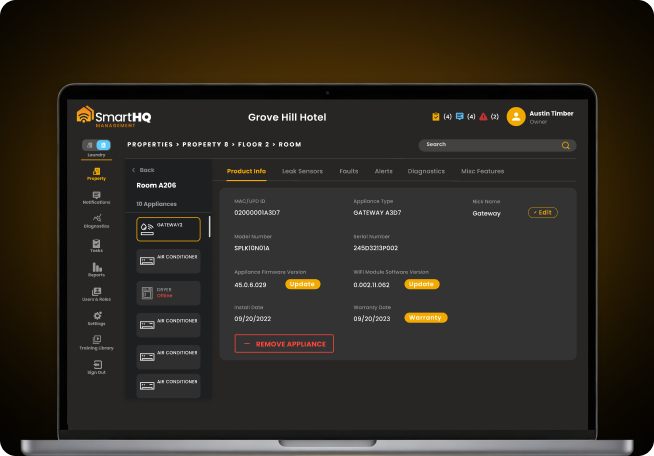
A property team can use a connected appliance view to organize equipment information across residential or commercial properties. Capabilities include real-time diagnostic and troubleshooting reports,real-time fault, status, leak alerts, and task management. Those functions address the gap between an appliance issue and the team's next documented action.
For example, take a multi-family maintenance request. A resident says their connected appliance is not working. Before dispatching anyone, the team reads the diagnostic data the appliance is already reporting, decides whether the situation needs an on-site visit, and assigns the next task from there. The resolution itself still depends on the specific fault, what the technician finds, the equipment’s condition, and how fast the team can respond.
SmartHQ™ Management also supports approved appliance controls. Temperature limits and Batch Command can help teams apply a defined setting across selected connected appliances. Controls and energy reporting should remain separate in the evaluation. A control changes an approved setting. A report describes measured resource use. Automatic energy-anomaly detection requires confirmation for the specific product configuration.
Deployment requirements for connected appliances
A connected operations project should begin with site readiness. SmartHQ™ Pro specifies the following requirements for its connected appliance environment:
- Site-wide 2.4 GHz Wi-Fi coverage at appliance locations.
- Signal strength of at least −85 dB at appliance locations.
- IPv4 networking.
- WPA or WPA2-PSK security.
WPA3 and WPA2-Enterprise are not supported according to the supplied SmartHQ™ Pro product guidance. Teams should validate coverage in units, laundry rooms, mechanical areas, and other planned appliance locations before commissioning.
A network check gives the deployment team a measurable starting point. The team can then identify weak coverage, confirm the security configuration, and plan commissioning through a mobile device. Leak detection adds a separate hardware requirement because sensors and a gateway are part of that setup.
How Should You Evaluate a Proptech Solution?
A useful evaluation connects the business problem to the data, workflow, and operating conditions required for a response. Four questions help property leaders compare options.
- What decision should the system improve? Define the decision before reviewing features. The goal may involve dispatching a technician, reviewing energy use, approving access, or following up on a resident request.
- What physical or operational signal supports that decision? Identify the source, such as an error code, temperature reading, water presence, access event, meter value, or work-order status.
- Who owns the response? Assign an individual or team, a priority, a due date, and a documented completion path. Alerts need an operating process to create value.
- Can the property support the deployment? Check network coverage, device locations, commissioning requirements, staff capacity, data governance, and ongoing maintenance.
A staged pilot can test these questions with less operational disruption. Choose a property or asset group that reflects normal conditions. Include difficult locations, common equipment types, and the people who respond to alerts. Measure response time, diagnostic usefulness, repeat visits, unresolved alerts, and staff adoption.
The evaluation should also separate measured outcomes from assumptions. A vendor may describe a potential efficiency benefit. The property team should test that benefit against its own baseline, fault mix, staffing model, and response process.
Benefits and Limitations of Proptech
Proptech creates value when it improves a defined property decision or workflow. A leasing platform can organize applicant steps. A smart access system can record credentials and entry events. An energy platform can structure usage data. Connected operations can provide asset signals before or during service work.
The limitations are practical. Hardware requires installation, connectivity, commissioning, and replacement planning. Data requires review and governance. Alerts require ownership and escalation rules. Staff need training, and each property may have different network conditions or equipment populations.
A connected system also has a defined coverage area. A point leak sensor detects water where the sensor probes are placed. An appliance platform provides information for supported connected appliances. A BMS may monitor selected building systems, while other assets remain outside its scope.
Clear boundaries improve buying decisions. Ask what the system measures, how frequently it reports, what actions it supports, which equipment it covers, and what happens when connectivity fails.
Proptech Works Best When Data Meets a Defined Response
Proptech gives property teams digital ways to manage the physical and commercial work behind real estate. Its categories span leasing, resident experience, smart access, ESG measurement, building management, and connected operations.
The strongest use cases share a structure. A property asset or workflow produces useful information. The right team receives that information. A defined action follows, and the result becomes part of the operating record.
That structure gives decision-makers a practical way to assess new technology in 2026. Start with the property problem, identify the signal, define the response, and test the result under real operating conditions. For appliance fleets, SmartHQ™ Management offers a focused connected-operations approach with monitoring, diagnostics, reports, alerts, controls, and task management. Property teams can visit SmartHQ™ Pro to review the platform and contact the team for current information.
Still managing your entire appliance fleet without real-time visibility?
- Real-time monitoring and precision diagnostics across your portfolio
- Remote controls and batch commands without room-by-room visits
Portfolio-wide
appliance visibility
Real-time
monitoring & control